






315MHz TPMS for Ford 2005-2011 Escape Edge Expedition Explorer Flex
$49.49
| Brand | Visit the POHILA Store |
|---|
-
 Free Shipping (4-7 Business Days)

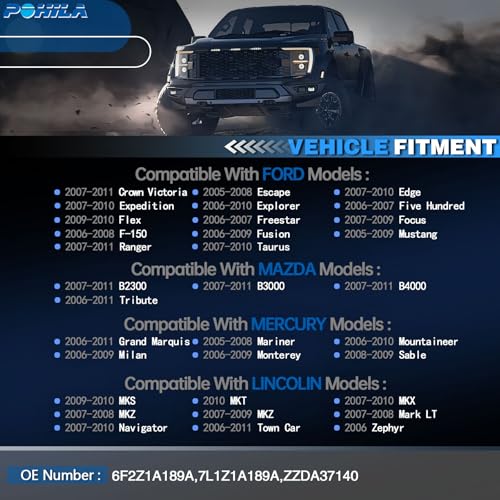
【FITMENT】The POHILA tire pressure sensor compatible with Ford 2006-2008 F150,2009-2010 Flex,2007-2010 Taurus,2005-2008 Escape,2006-2010 Explorer,2007-2011 Ranger,2006-2009 Fusion,2007-2010 Expedition,2005-2009 Mustang,2007-2009 Focus,2007-2010 Edge,Compatible with Lincoln 2007-2009 Mkz,2006 Zephyr,2007-2010 Navigator,2007-2010 Mkx & More. Please double check the compatibilty before purchase to avoid unnecessary installation fees.For more precise vehicle compatibility, please refer to the details page
【REPLACE PART NUMBER】6F2Z1A189A,7L1Z1A189A,ZZDA37140. No reprogramming is required; our product is pre-programmed and only needs activation to be used.
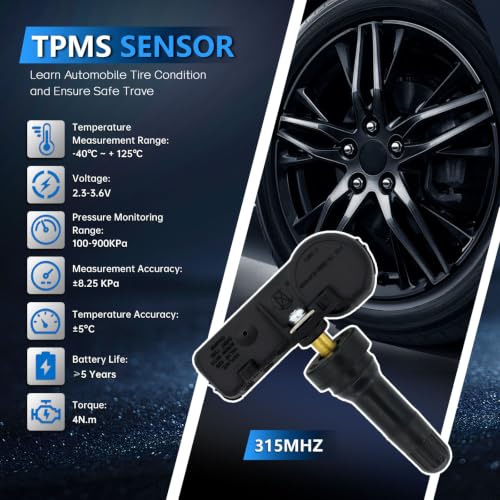
【High Quanlity】This tire pressure sensor is manufactured to exacting OE standards to ensure reliable performance and durability, it is constructed of high quality material, premium chip and durable lithium battery, every component has undergone extensive.The battery can be used normally for more than 5 years,and can withstand operating temperatures from -40°c to +125°c.
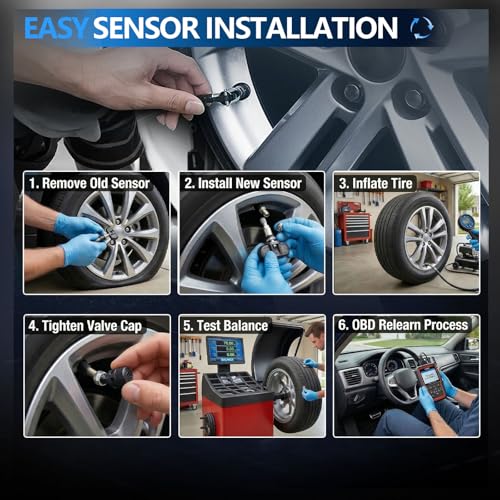
【PRECAUTIONS】OBDII Relearning: 1. Requires an OBDII connector and confirms the Tire Pressure Monitoring System (TPMS) sensor is correctly installed; 2. Adjust tire pressure to the value shown on the label; 3. Activate the TPMS tool next to the valve stem on the left front tire sidewall and repeat the above steps for the right front/right rear/left rear tires; 4. Connect the OBD connector to the DLC; 5. Turn the ignition switch to ON; 6. Press the OK button on the TPMS tool to transfer data to the ECU; 7. Disconnect the OBD connector from the DLC; 8. Turn the ignition switch to OFF, start the engine, and finally drive at 28 mph for at least 5 minutes.
【VERIFY VEHICLE FITMENT】STOP INSTALLATION if it has no response. Before installation, pls use tpms tool to scan the tpms sensor. If it can’t be read or triggered correctly, DO NOT proceed with the sensor replacement installation. 1. Please check the “Amazon Confirmed Compatibility” information to determine if your vehicle is compatible; 2. Please check the matching information related to “Applicable Models” on the page to ensure the model and year are correct; 3. If you have any questions, please feel free to contact us.
Related products


